前一篇用物件型別整理資料有哪些欄位,以及各欄位接受的型別。有些文字欄位只接受幾個固定值;如果寫成一般的 string,其他字串也會通過檢查。字面值型別與聯集能把允許的範圍寫清楚,讓 TypeScript 擋下規則外的值。
從一般字串收窄成固定值#
字面值型別(literal type)表示一個特定的值。"choice" 可以是型別,不只是資料:
type ChoiceQuestion = { type: "choice" };
const valid: ChoiceQuestion = { type: "choice" };const invalid: ChoiceQuestion = { type: "fill" }; // 編譯期錯誤
當允許值不只一個,可以用聯集型別(union type)列出可能性:
type QuestionType = "choice" | "fill";
let kind: QuestionType = "choice";kind = "fill";kind = "essay"; // 編譯期錯誤
| 的意思是「這個值符合列出的其中一個型別」。
把規則放回題目模型:
type Question = {  readonly id: string;  prompt: string;  type: QuestionType;};
const question: Question = {  id: "day-10-01",  prompt: "哪個關鍵字用來匯出?",  type: "choice",};
若把 type 寫成未列出的字串,錯誤會在資料建立處被指出。
兩個布林值會放行不合理的題型組合#
假設題目只有選擇題或填空題,直覺寫法可能是:
type QuestionFlags = {  isChoice: boolean;  isFill: boolean;};
const missingType: QuestionFlags = { isChoice: false, isFill: false };
missingType 會通過型別檢查,但兩個 false 表示這題沒有題型。兩個欄位都填 true 也會通過,卻表示同一題同時是選擇題和填空題。題目只能選一種時,這個型別就太寬了。
函式使用多個布林參數時,呼叫處只會顯示 true、false,很難直接看懂各自代表什麼。這種閱讀困難稱為布林盲點(boolean blindness):
function renderQuestion(prompt: string, isChoice: boolean, isFill: boolean) {  console.log(prompt, isChoice, isFill);}
renderQuestion("哪個關鍵字用來匯出?", true, false);
看到這個呼叫,還得回頭對照參數順序,才知道 true 表示選擇題。改用前面定義的 QuestionType,呼叫處就能直接寫出題型,型別也只允許 "choice" 或 "fill"。下面的函式取代上面的版本:
function renderQuestion(prompt: string, type: QuestionType) {  console.log(prompt, type);}
renderQuestion("哪個關鍵字用來匯出?", "choice");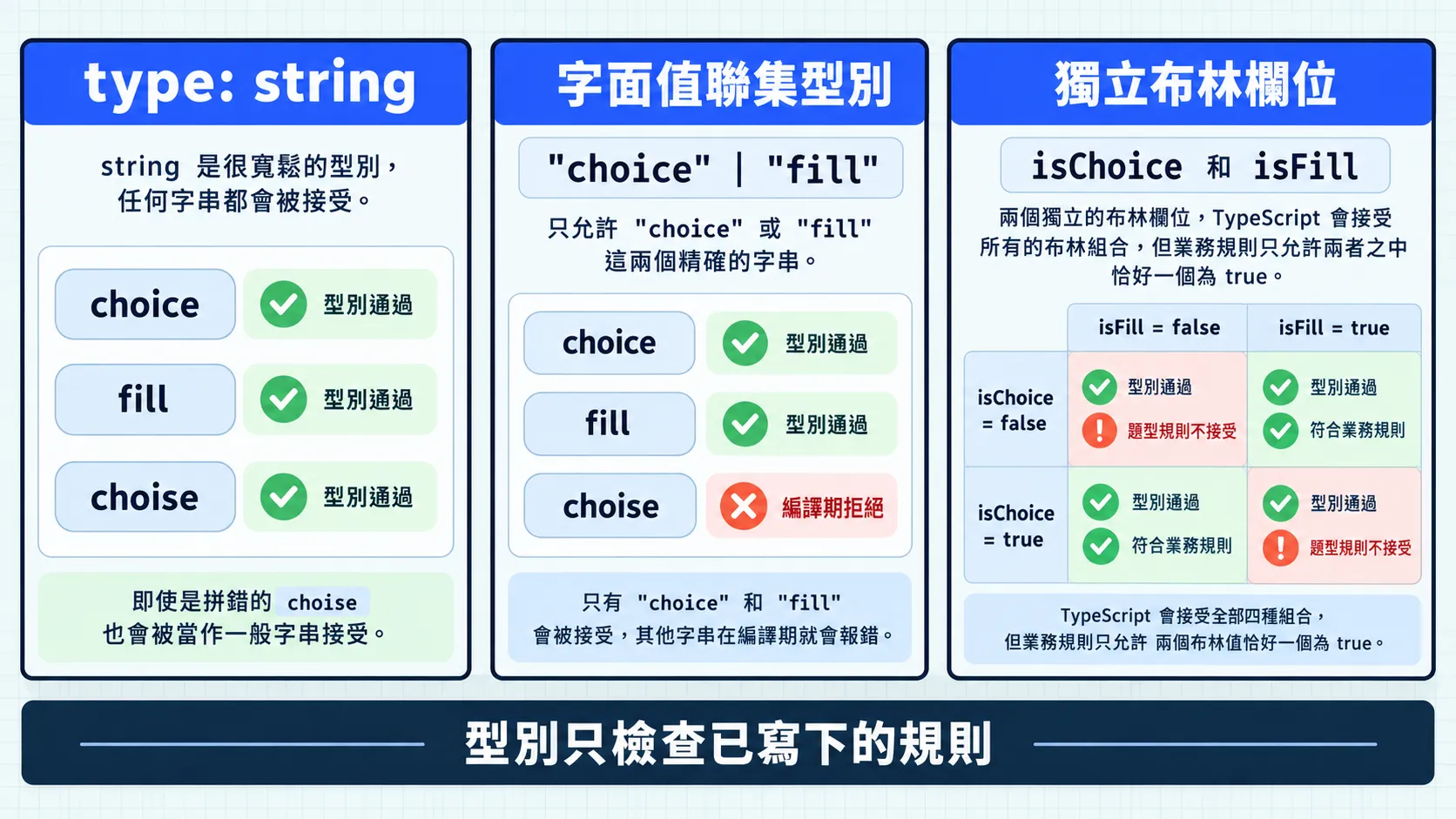
今日練習#
結論#
字面值型別表示特定值,聯集型別用 | 列出合法的可能。把題型寫成 "choice" | "fill",TypeScript 就能在編譯時指出拼錯的名稱,也能避免兩個獨立布林值造成的矛盾組合。
拿到聯集型別的值後,程式還需要判斷目前是哪一種,才能決定接下來怎麼處理。這就接到下一篇的型別縮小。