前一篇比較了 interface 和 type。這篇接著看 TypeScript 怎麼判斷資料能不能交給某段程式使用,這種判斷叫型別相容性。型別名稱不同,資料仍可能相容。
TypeScript 比較的是結構#
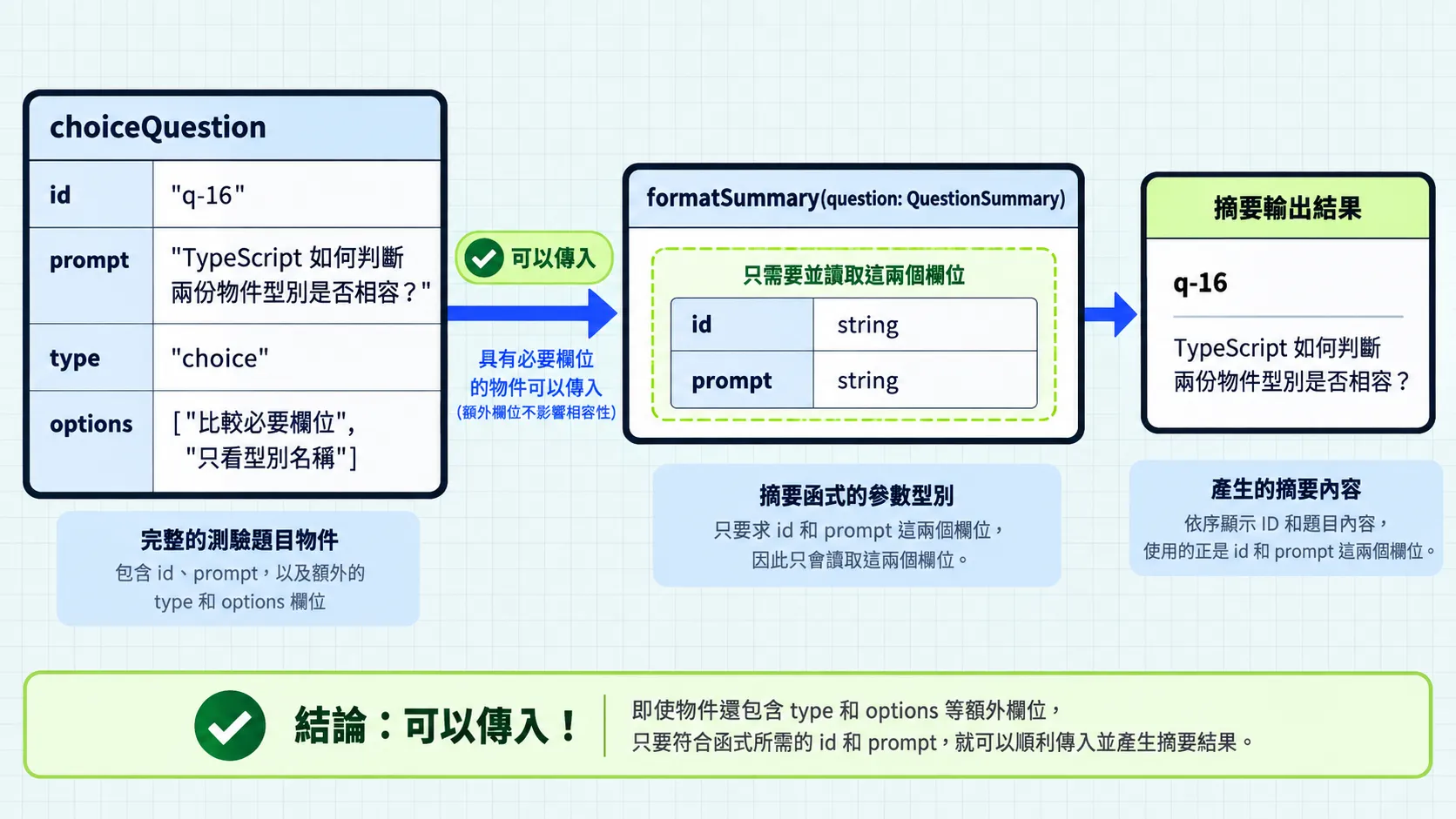
interface QuestionSummary {  id: string;  prompt: string;}
interface ChoiceQuestion extends QuestionSummary {  type: "choice";  options: string[];}
function formatSummary(question: QuestionSummary): string {  return `${question.id}:${question.prompt}`;}
const choiceQuestion: ChoiceQuestion = {  id: "q-16",  prompt: "TypeScript 如何判斷兩份物件型別是否相容?",  type: "choice",  options: ["比較必要欄位", "只看型別名稱"],};
formatSummary(choiceQuestion); // 通過
結構型別(structural typing)會依物件具備的欄位與型別,判斷它能否交給函式使用。choiceQuestion 多了題型和選項,仍然能交給只讀 id 和 prompt 的函式;欄位符合要求就可能相容,用途則要由程式另外表達。
想查其他型別能否互相使用的判斷規則,可參考 TypeScript 官方手冊的型別相容性說明。
直接寫物件時的多餘屬性檢查#
同樣是交給 formatSummary,直接寫物件時,TypeScript 會多檢查一件事:物件有沒有寫出參數型別未宣告的欄位。這叫多餘屬性檢查(excess property checking)。
formatSummary({ id: "q-17", prompt: "TypeScript 的型別在執行時還存在嗎?", type: "choice", options: ["存在", "不存在"],}); // 編譯期錯誤:QuestionSummary 沒有 type、options。QuestionSummary 只要求 id 和 prompt,因此直接寫入的 type、options 會被指出來。前面的 choiceQuestion 卻能傳入,因為它已經是一個變數;TypeScript 只檢查它是否具備函式需要的欄位。
若要先確認這筆資料是完整的選擇題,可以使用前面宣告的 ChoiceQuestion:
const nextQuestion: ChoiceQuestion = {  id: "q-17",  prompt: "TypeScript 的型別在執行時還存在嗎?",  type: "choice",  options: ["存在", "不存在"],};
formatSummary(nextQuestion); // 通過
宣告 nextQuestion 時會檢查 ChoiceQuestion 要求的欄位;傳給 formatSummary 時則只需要符合 QuestionSummary。直接把物件指派給標明型別的變數,也會觸發多餘屬性檢查。
遇到其他類似的欄位錯誤時,可參考 TypeScript 官方手冊的多餘屬性檢查說明,核對檢查何時會觸發。
一樣是字串,看不出用途#
結構型別比對的是型別本身,不看名字,也不管這個值在程式裡代表什麼。物件要比對欄位才能相容;string 這種型別只要對得上就會通過,所以題目 ID、選項代號和使用者的暱稱,只要是字串都會收下。
interface QuestionResult {  questionId: string;  isCorrect: boolean;}
function findResult(results: QuestionResult[], questionId: string) {  return results.find((result) => result.questionId === questionId);}
type QuestionId = string;
findResult(results, selectedId); // 通過
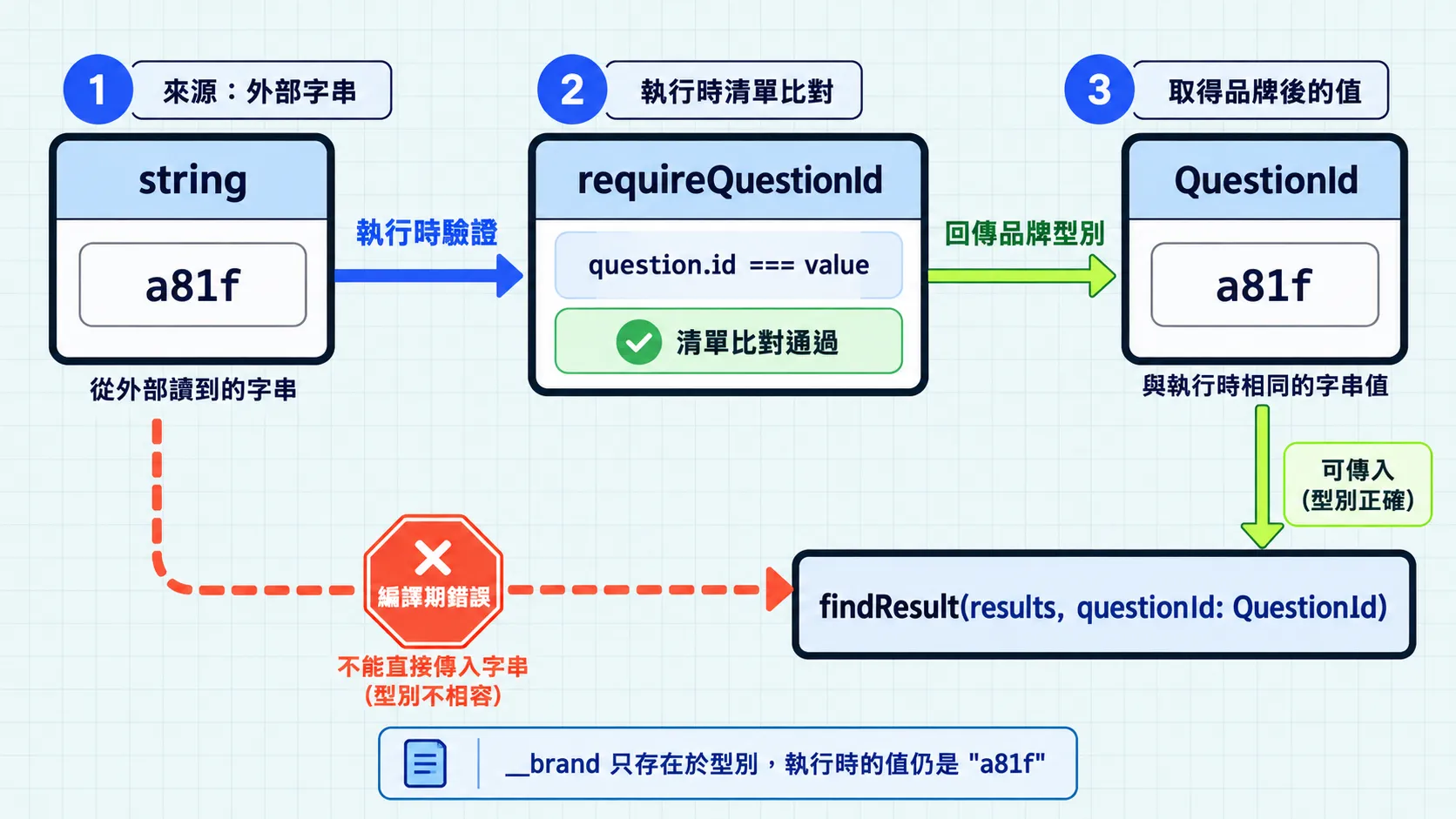
selectedId 是從外部讀到的字串,例如 "a81f"。type QuestionId = string 只是換個名字,檢查結果自然一樣。名稱方便人閱讀,對編譯器卻沒有約束力:它不會因為你叫它 QuestionId,就確定這個值真的對應到一筆題目。兩個都是字串的欄位互相比較時,編譯器也一律放行,即使其中一邊是題目文字而不是 ID。
用品牌型別加上記號#
既然相容與否看的是欄位,那就多給它一個欄位:
type QuestionId = string & { readonly __brand: "QuestionId" };
function findResult(results: QuestionResult[], questionId: QuestionId) {  return results.find((result) => result.questionId === questionId);}
findResult(results, selectedId); // 編譯期錯誤:string 不能指定給 QuestionId
__brand 這個欄位在執行時不存在,值還是原本的字串。品牌型別(branded type)是把結構型別反過來用:原本「長得一樣就能互換」,現在「長得不一樣就不能互換」。上面只有參數換成 QuestionId;QuestionResult.questionId 仍是 string,因為判分結果是外部資料,型別不會替它驗證。
它記下的是一項事實:這個值已經通過確認。這件事在執行時沒有對應的資料,只是在型別上多一個欄位,編譯器就能靠它一路追蹤下去。
確認過才算是題目 ID#
確認的方式是查一次題目清單:
function requireQuestionId(  value: string,  questions: QuestionSummary[],): QuestionId {  if (!questions.some((question) => question.id === value)) {    throw new Error("找不到對應的題目");  }
  return value as QuestionId;}
some 逐筆比對,只要有一筆相同就通過;全部比完都沒有,就走到 throw。
as QuestionId 是整段唯一的斷言,也是責任所在明這個字串對應到題目,TypeScript 才接受後續把它當成 QuestionId。之後的函式不必再確認一次,型別已經替它們記住這件事。
const questionId = requireQuestionId(selectedId, questions); // 型別是 QuestionIdfindResult(results, questionId); // 通過
findResult(results, selectedId); // 編譯期錯誤:string 不能指定給 QuestionId
品牌型別只存在編譯期,執行時的值還是一般字串,真正檢查資料的仍然是程式本身,型別負責把檢查過的結果傳下去。同一個字串如果在多處流動、需要區分用途,這種記號才有價值;只有一兩處用到時,維持 string 就好。
今日練習#
結論#
結構型別讓完整題目可以交給只需要部分欄位的函式。直接寫物件時,多餘屬性檢查會另外指出未宣告的欄位。品牌型別則是反過來利用同一套規則:把「已確認」做成一項欄位,沒確認過的字串就不相容。下一篇會把相容性帶到函式的參數與回傳值。