前一篇介紹如何檢查收到的資料。接下來要想的是:建立資料時需要填什麼,保存時需要記錄什麼,回傳給使用者時又應該提供什麼?這些用途需要的欄位可能不同,型別也可以分開定義。
一份型別為什麼不夠?#
資料在建立、儲存與回傳時,可能有不同的必填欄位與公開範圍。分開定義型別,可以讓每種用途各自表達完整的要求。若為了共用型別,把所有欄位都改成選填,原本必要的欄位也會變成可以省略。
// 改進前:為了共用,將所有欄位設成選填interface SharedQuestion {  id?: string;  prompt?: string;  answer?: string;  createdAt?: Date;}
// 所有欄位都有 ?,因此空物件也能通過型別檢查const incomplete: SharedQuestion = {};區分新增資料與保存資料#
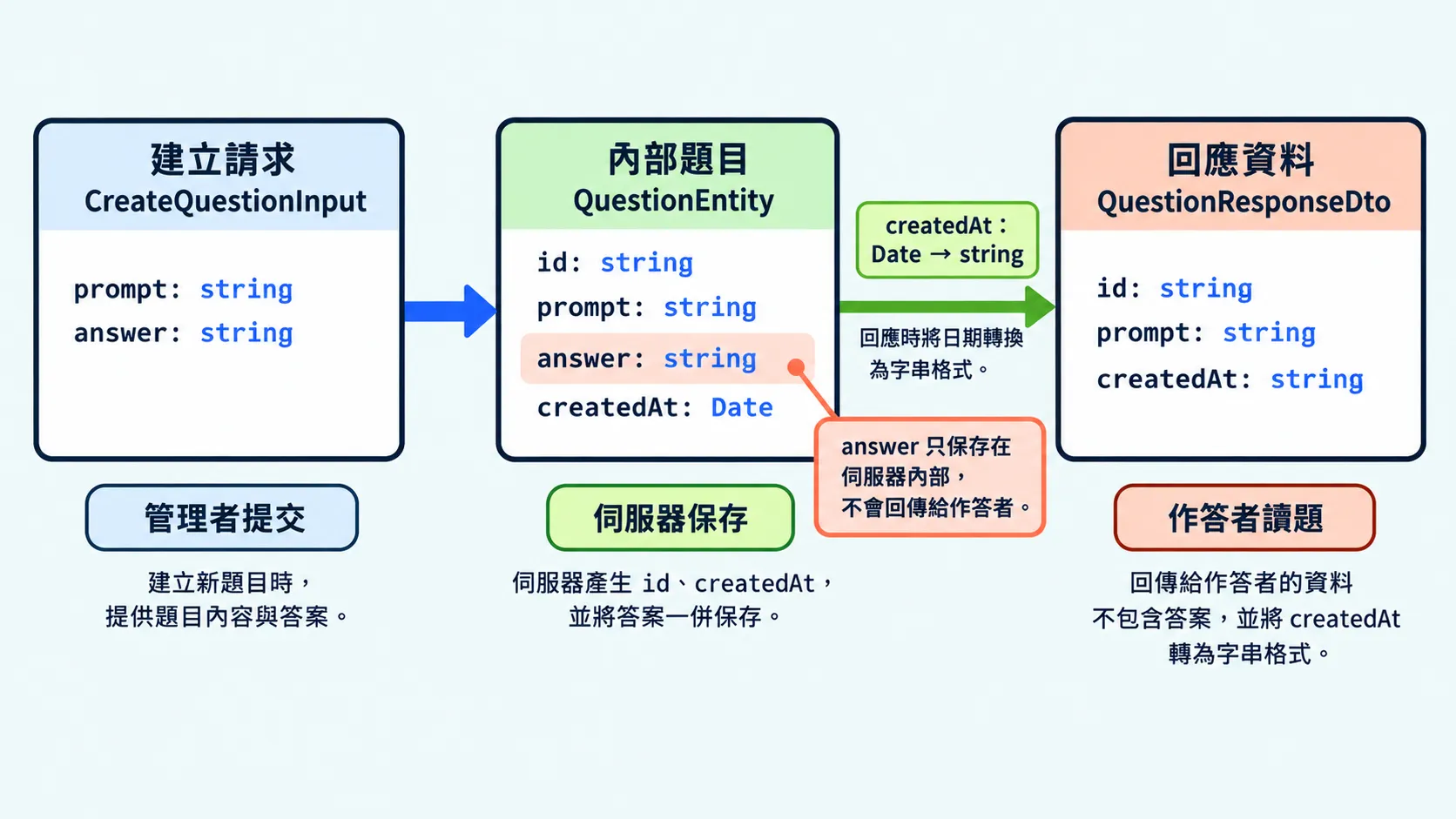
建立請求(create input)定義新增資料時要提供哪些欄位。編號、建立時間等由系統自動產生的資料,就不需要一起傳入。
// 建立題目時提交的資料;id 與 createdAt 由伺服器產生interface CreateQuestionInput {  prompt: string;  answer: string;}
// 前面的 SharedQuestion 全部選填,允許傳入空物件// 這裡的 prompt 與 answer 都是必填,少了任一欄位就會報錯// const missing: CreateQuestionInput = {};
實體(entity)描述系統內保存的完整資料,包含建立時提供的內容與系統產生的資訊。
interface QuestionEntity { id: string; // 伺服器產生的編號 prompt: string; answer: string; // 答案只留在伺服器內 createdAt: Date; // 伺服器記錄建立時間}// 建立請求:必須提供題目文字與答案const input: CreateQuestionInput = { prompt: "哪個關鍵字宣告變數?", answer: "const",};
// 保存資料:補上系統產生的欄位,符合 QuestionEntityconst saved: QuestionEntity = { ...input, id: "q24", createdAt: new Date(),};共同欄位的要求相同時,也可以用 Pick 共用定義:
// 若要共用欄位定義,可用這個型別取代前面的 CreateQuestionInput// 從 QuestionEntity 取出 prompt 與 answer,保留它們的型別與必填要求// 不包含系統產生的 id 與 createdAttype CreateQuestionInputFromEntity = Pick<QuestionEntity, "prompt" | "answer">;更新請求只開放可修改的欄位#
更新請求(update input)描述這次操作可以修改的欄位。欄位是否選填,取決於操作允許哪些修改。
// 更新題目文字時,必須傳入新的 promptinterface UpdateQuestionInput { prompt: string;}Partial 會把所有欄位改成選填,但可修改哪些欄位,需要另外決定。直接套用完整的實體型別,就會連系統產生的欄位也一起開放。
// 這個型別連 id 都允許傳入,超出只修改題目文字的需求// type UpdateQuestionInput = Partial<QuestionEntity>;// const update: UpdateQuestionInput = { id: "another-id" };可以先用 Pick 選出允許修改的欄位,並保留必填要求:
// 前面的 UpdateQuestionInput 也可以改用這種寫法,只包含必填的 prompt// type UpdateQuestionInput = Pick<QuestionEntity, "prompt">;
const update: UpdateQuestionInput = { prompt: "新的題目文字" };// const invalidUpdate: UpdateQuestionInput = { id: "another-id" }; // 錯誤:沒有 id 欄位
回應 DTO 描述對外傳送的資料#
資料傳輸物件(Data Transfer Object,DTO)描述程式之間傳送的資料格式。回應 DTO 定義 API 要回傳哪些欄位,以及各欄位的型別。
回傳資料前,可以用函式挑出要公開的欄位,並將值轉成回應需要的格式。標上回傳型別後,TypeScript 就會檢查函式產生的資料是否符合要求。
// 給作答者的回應不包含答案,日期使用字串interface QuestionResponseDto {  id: string;  prompt: string;  createdAt: string;}
function toQuestionResponseDto(question: QuestionEntity): QuestionResponseDto {  return {    id: question.id,    prompt: question.prompt,    // 日期轉成回應使用的字串    createdAt: question.createdAt.toISOString(),  };}
用 Omit 排除欄位後,實際物件裡的資料仍會保留。下面比較直接指派與呼叫轉換函式的結果:
type PublicQuestion = Omit<QuestionEntity, "answer">;
// 型別中省略 answer,但只是將 saved 指派給另一個變數// 兩個變數指向同一個物件,物件裡仍然有 answerconst publicQuestion: PublicQuestion = saved;// Object.keys() 列出物件實際包含的欄位名稱console.log(Object.keys(publicQuestion));// ["prompt", "answer", "id", "createdAt"]
// 前面的轉換函式建立新物件,只放入要回傳的欄位const response = toQuestionResponseDto(saved);console.log(Object.keys(response));// ["id", "prompt", "createdAt"]
收到 API 回應後,有時會先整理資料再顯示,例如將日期轉成方便閱讀的文字。這些給畫面使用的資料,也可以另外定義型別。
畫面模型定義畫面要使用的資料。例如 API 回傳 createdAt 日期字串,畫面模型可以另外提供 createdAtText,用來顯示「2026 年 10 月 7 日」。回應資料已經符合畫面需求時,就可以直接使用。
今日練習#
結論#
建立與更新請求描述可以提交什麼,實體描述系統內保存什麼,回應 DTO 描述對外傳送什麼。先區分用途,再決定欄位,就能讓型別清楚表達每一處的要求。
除了回應內容,呼叫端也需要知道操作成功或失敗。下一篇會介紹如何用型別描述這些結果。