函式除了回傳成功的資料,也可能遇到無法完成操作的情況。如果所有失敗都回傳 null,呼叫端就無法從結果知道原因。把失敗也寫進型別,可以讓使用端知道有哪些情況需要處理。
分開表示處理結果與失敗原因#
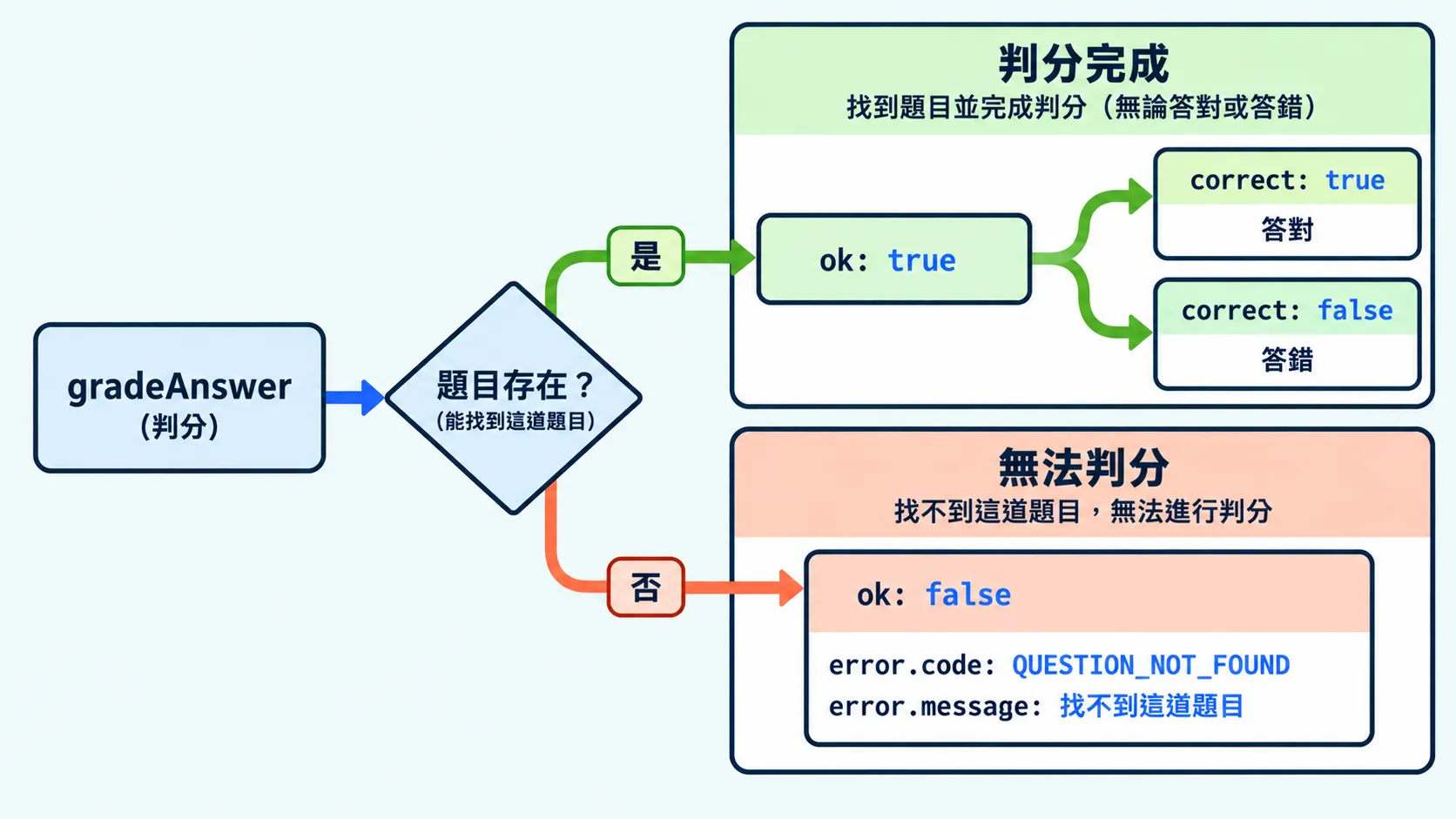
結果模式(Result pattern)用不同的回傳分支表示成功與失敗。成功分支放處理結果,失敗分支放原因,呼叫端再依分支決定下一步。
type GradeResult = // 答對與答錯都表示判分已完成,分別使用 correct: true 與 false | { ok: true; correct: boolean } // 找不到題目時無法判分,因此回傳失敗原因 | { ok: false; error: { code: "QUESTION_NOT_FOUND"; // 程式用來辨識「找不到題目」 message: string; // 顯示給使用者的錯誤說明 }; };這裡使用前面介紹過的可辨識聯集。判斷 ok 後,TypeScript 就能知道可以讀取成功結果,還是錯誤資訊。
錯誤代碼是用來區分失敗原因的固定值。程式可以比較代碼來選擇處理方式,顯示的錯誤文字則可以另外修改。
將可預期的失敗寫進回傳型別#
可預期的失敗,是設計功能時已經考慮到、並安排好處理方式的失敗情況。可以將這些情況寫進回傳型別,交給呼叫端處理。
// 伺服器保存的題目資料,這裡只保留編號與正確答案interface QuestionEntity {  id: string;  answer: string;}
// 使用者送出的作答資料:題目編號與填寫的答案interface AnswerInput {  questionId: string;  answer: string;}
function gradeAnswer(  input: AnswerInput,  questions: QuestionEntity[],): GradeResult {  // 用作答資料中的 questionId,找出要判分的題目  const question = questions.find((item) => item.id === input.questionId);
  // 題目可能已被刪除,但使用者仍從舊頁面送出答案  if (!question) {    // 無法比對答案,回傳 GradeResult 的失敗分支    return {      ok: false,      error: { code: "QUESTION_NOT_FOUND", message: "找不到這道題目" },    };  }
  // 找到題目後,比對使用者答案與正確答案  // ok: true 表示判分完成,correct 才表示答案是否正確  return { ok: true, correct: input.answer === question.answer };}
接著準備一筆題目資料,測試不同的作答。判分完成與無法判分時,會分別回傳成功與失敗兩種型別的物件:
// q25 的正確答案是 "const"const questions: QuestionEntity[] = [{ id: "q25", answer: "const" }];
// 題目存在,而且答案相同console.log(gradeAnswer({ questionId: "q25", answer: "const" }, questions));// { ok: true, correct: true }
// 題目存在,但答案不同:判分仍然完成,所以 ok 是 trueconsole.log(gradeAnswer({ questionId: "q25", answer: "let" }, questions));// { ok: true, correct: false }
// 題目陣列裡沒有 missing,無法取得正確答案來判分console.log(gradeAnswer({ questionId: "missing", answer: "const" }, questions));// { ok: false, error: { code: "QUESTION_NOT_FOUND", message: "找不到這道題目" } }用條件判斷縮小型別#
GradeResult 是成功與失敗兩種型別的聯集。判斷 ok 後,TypeScript 會將 result 縮小成對應型別,讓程式讀取該分支的欄位。
const result = gradeAnswer({ questionId: "missing", answer: "const" }, questions);
if (result.ok) {  // result 是成功型別,有 correct  console.log(result.correct);  // result.error; // 型別錯誤:成功型別沒有 error} else {  // result 是失敗型別,有 error  console.log(result.error.code); // QUESTION_NOT_FOUND  console.log(result.error.message); // 找不到這道題目  // result.correct; // 型別錯誤:失敗型別沒有 correct}
如果之後需要區分更多失敗原因,可以擴充錯誤代碼,再加入對應的處理方式。
什麼時候用 throw?#
回傳失敗結果後,呼叫端會取得結果,繼續執行後面的程式。throw 則會中斷目前流程,把錯誤往外傳;有對應的 catch 時,就跳到那裡處理。
同樣是找不到題目,也可以選擇拋出錯誤:
function gradeOrThrow(input: AnswerInput, questions: QuestionEntity[]): boolean {  const question = questions.find((item) => item.id === input.questionId);  if (!question) {    throw new Error("找不到這道題目");  }  return input.answer === question.answer;}
try {  const correct = gradeOrThrow({ questionId: "missing", answer: "const" }, questions);  console.log(correct); // 發生錯誤時,這行不會執行} catch (error) {  if (error instanceof Error) {    console.log(error.message); // 找不到這道題目  } else {    console.log("發生未知錯誤");  }}
兩種方式都能處理失敗,可以依呼叫端需要的處理方式選擇:
| 方式 | 呼叫端如何處理 | 適合的情況 |
|---|---|---|
| 結果模式 | 讀取回傳值,用條件判斷區分分支 | 需要依失敗原因提供提示或修正方式 |
throw | 用 try/catch 捕捉錯誤 | 需要交給外層統一記錄與處理 |
TypeScript 的回傳型別只描述正常回傳的值,拋出的錯誤不會自動列在其中。因此 gradeOrThrow 宣告回傳 boolean,也可能因 throw 而中斷。
JavaScript 可以拋出字串、物件等不同的值。在 strict 設定下,catch 參數預設是 unknown,所以範例先用 instanceof Error 判斷,再讀取 message。官方錯誤捕捉文件說明這項型別檢查。
今日練習#
結論#
設計回傳型別時,也要想好操作失敗後,使用端需要知道什麼。用不同分支描述成功與失敗,再用錯誤代碼區分原因,就能讓處理方式更明確。
這些函式也可以放進框架的服務中使用。接下來會看看框架如何組織這些程式,以及類別在其中扮演的角色。